Off-site & recovery
Off-site copies wait after a rebuild
When step 4 rebuilds entries without the old settings, off-site replication of those domains pauses until the placement default is confirmed. See Placement per item.
Local backups protect you from a lost container or a bad update. Off-site replication and a tested recovery kit protect you from the whole box, ransomware, or a fire. This page covers replicating off-site, making that copy tamper-proof, proving you can restore, and recovering when BombVault itself is gone.
Off-site replication
Keep the fast local backup and add one or more off-site replicas. Set a repo per domain on the Settings, Off-site page. BombVault replicates new snapshots there with restic copy on a best-effort basis, so an off-site hiccup never fails the local backup. In this shape the local repo stays primary and the off-site repo is a replica, but a domain's primary repo does not have to be local at all; see Remote primary repositories below for backing up straight to S3/rest-server/etc. instead of replicating to it.
- Multiple off-site targets per domain. Each domain (containers, VMs, flash, config, file sets and ZFS datasets) can replicate to several off-site destinations at once, not just one, so you can keep, for example, a rest-server on a friend's box and an S3 bucket in parallel. Add extra targets on Settings, Off-site, each with its own repository, S3 storage class, append-only flag, retention and growth budget. An existing single off-site setup is carried over untouched as the first target, and every target of a domain replicates on that domain's off-site schedule.
- Per-domain off-site schedule (edited alongside every other schedule on Settings, Schedules): leave it blank to replicate after every local backup, or set a cadence (for example
weekly Sun 03:00) to ship off-site less often than you back up locally. A Replicate now button covers on-demand runs. - Off-site retention lives on Settings, Retention so you can keep off-site copies longer as an archive. Leave the policy all-zero to never auto-trim off-site snapshots.
- Bandwidth limits (Settings, Off-site) cap the restic upload/download rate so replication does not saturate your WAN.
- A replication indicator shows which domain is replicating while it runs (on its page and the Dashboard). It is an active indicator, not a percentage bar, because
restic copyexposes no machine-readable progress.
Restore from any place
Every container, VM, folder set, the flash and the app configuration list their backups as one timeline across all places a backup lies. A backup copied to B2 appears once, marked with each place that holds it. A restore takes the first place it can reach, starting with the repository the item is written to, and you can pick another place per row. Off-site places are read only when you open them. Deleting at one place first checks the others and says whether it was the last copy.
Destinations
Settings, Off-site starts with Destinations: the places off-site copies go, set up once for every domain. A destination then shows up as a button in the Placement row of every domain and item. The first time it is ticked for a domain, BombVault creates that domain's repository in a folder under it, for example rclone:onedrive:BombVault/containers. Flash, self-backup and ZFS datasets have no placement row, so their off-site section has an Add from button for each destination instead.
Add destination opens a wizard in five steps:
- Where should the backups go? Every service is listed with its logo, in four groups: storage services with S3 buckets (Backblaze B2, Wasabi, Cloudflare R2, Hetzner Object Storage, Amazon S3 and others), your own S3 server (Garage, SeaweedFS, RustFS, Silo, Ceph, JuiceFS, Versity S3 Gateway), your own server and shares (rest-server, Hetzner Storage Box, SFTP, SMB, WebDAV, a mounted path) and cloud storage (OneDrive, Google Drive, Dropbox, pCloud, Nextcloud and the rest rclone supports). Each one says how well it suits backups: cloud drives slow down under many requests, so the first backup and pruning take longer there.
- Sign in. The fields depend on the service: an access key for S3, a user and password for WebDAV and SMB, an app password where two-factor sign-in blocks the normal one, BombVault's public SSH key for SFTP and the Storage Box, or a token for services that sign in through a browser. For those, the wizard shows an
rclone authorizecommand to run on a computer with a browser; the token it prints goes into the field. Test connection checks the sign-in before anything is saved. - Choose a folder. The wizard lists the folders on the destination, with New folder to create one and the free space where the service reports it. An empty folder is safest.
- Protection against deletion. The wizard says plainly what the service can do. A rest-server in append-only mode refuses deletion, and the tamper test checks that. An S3 bucket can keep old versions with versioning and object lock, which BombVault cannot check yet. A cloud drive cannot refuse deletion at all: whoever gets into the server gets into that copy too. Switch Immutable on only where the far side really refuses deletion; BombVault then never prunes there.
- For an emergency. The recovery kit lists every destination with the repository of each domain under it. The sign-in comes back with BombVault's settings backup; on a fresh install without it, set the destination up again at the same place.
S3 services run through restic's own S3 backend, which is what lets a storage class and object lock apply. Every other service runs through the rclone BombVault ships, and its remote then appears in the rclone config under Settings, Cloud access. A settings export carries the destinations; with credentials included it carries their sign-in as well.
A receiving server that another instance of your group runs appears in the wizard under From your group; see Receiving server.
A domain's target made from a destination takes the destination's name, location, credentials, storage class and immutable switch. Its retention, compression and growth budget stay per domain, and its location cannot move because the domain's repository is there. Add a target for this domain only under each domain still takes a hand-typed repository URL.
A hand-typed target whose repository lies in a folder of a destination can join it. The destination lists such targets under Already under this destination, and Take over hangs one on it. The target keeps its repository, snapshots, retention and placement, and takes the destination's name, credentials, storage class and immutable switch. BombVault first checks that the destination's sign-in opens the repository, and it refuses to put an append-only target under a destination that is not append-only. Taking over a domain's primary empties that domain's off-site field.
Placement per item
Each container, VM and folder set card has a Placement row of buttons: Local and one button per off-site target of the domain, followed by the destinations the domain has no target under yet. Lit buttons get the item's backups.
- With Local lit, the item is written to the repository shown under Stored on and copied to every other lit target. Darken a target and it gets nothing new from this item. Local alone copies nowhere, which suits data that already has a second copy, for example a share that lives on a NAS.
- With Local dark, the item is written straight to the direct repository of the first lit target and copied from there to the other lit targets. The first time, a dialog creates that direct repository.
- A destination button creates the domain's target under the destination and lights it for this item only. Every other item starts without a copy there.
- One button stays lit, because a backup needs a place to go. To leave something out of backups, exclude it.
The location is fixed from the item's first backup on, because BombVault never moves backups between repositories. The copies can change at any time. A target that no longer gets an item keeps the copies it has and trims them to its own retention at the next off-site run of the domain; Delete in B2 on the card removes them at once. When some of those copies exist nowhere else, the confirmation lists them by date and asks for the item's name. Append-only targets cannot be deleted from.
Under the row the card says where the item goes and what is actually there: how many sites hold it, when each target was last seen, and whether 3-2-1 is met. A site is the server with the original data, each off-site target and each repository marked Off the premises. BombVault checks copies and sites; it does not check the "two media" part of 3-2-1.
Placement defaults
Settings, Storage, Placement defaults has one row per domain with the same buttons. The copies apply at once to every item without a choice of its own, and to the project folders of Compose stacks. The location applies to a new item at its first backup; changing it moves no backups. Before saving, the row names every target that gains or loses items and how many snapshots that means. Apply to items without backups puts every item that has no backup yet back on the default.
A new off-site target receives every item that is not set to Local. The dialog that adds it says how many items and, where known, how much history that is, and offers to leave out the items already excluded from other targets.
Direct repositories
Turning Local off for an item, so that a target without a direct repository becomes its home, opens a dialog with a suggested location next to the target, for example s3:https://s3.eu-central-003.backblazeb2.com/bucket/containers-direct, and a connection test that creates nothing. Create and use creates the repository and points the item at it. A direct repository takes the target's key, storage class, limits, append-only setting and retention, and changes with them; the Repositories card shows it read-only. When a new key for the target cannot open it, the direct repository keeps the key it has and the save says so. An item on a direct repository is copied from there to the other lit targets, never to the target the repository belongs to. Its snapshots carry the tag bv:direct, and every other retention pass keeps them, so a direct repository that lost its link to its target never ages by the local rules. B2 is reached through its S3 endpoint, with the key ID and application key entered as the S3 credentials; a key limited to the target's own folder cannot reach the folder next to it, so limit the key to the folder above the target instead.
Off the premises
A named repository can be marked Off the premises on the Repositories card. Remote repositories start marked; switch it off for a rest-server in the same building. The mark only counts sites and 3-2-1 on the cards. It changes no copy.
After a rebuild
Copy choices live in BombVault's own settings. After a rebuild through Discover backups without a restored /config they are gone, and copying everything would send the items you had left out to B2 again. Off-site replication of every rebuilt domain therefore pauses. The Dashboard shows it in amber, and Placement defaults offers Confirm default with a preview of what the next run copies and the names in the backups that have no entry, which you can leave out there. Only the confirmation ends the pause; importing a settings file brings back rules and defaults but does not end it.
Remote primary repositories
A domain's Backup Path (Settings, Storage) is not limited to a local folder: point it straight at a restic remote (s3:..., rest:http://host:8000/repo, sftp:user@host:/repo, rclone:remote:bucket/path) and BombVault backs up to it directly, with no separate local copy and no replication step. This is a genuinely different shape from off-site replication above: there the local repo is primary and the off-site repo is a best-effort archive of it; here the remote repo is the primary, and it is the only copy unless you also configure off-site replication (or a second remote) for that domain.
Each of the six path fields (Containers, VMs, Flash, Self-Backup, Folders, ZFS datasets) has an inline Local / Remote switch right next to it:
- Local shows the familiar folder browser.
- Remote swaps it for a plain URL field, plus a button that opens the same connection-test/credentials dialog off-site destinations use, configured for this primary instead. From there you get:
- A connection test against the live path, before you rely on it.
- Bandwidth limits (upload/download) so a scheduled backup to a remote primary does not saturate your WAN — the same
--limit-upload/--limit-downloadrestic flags off-site replication uses, applied to the backup itself. - Append-only (immutable) protection, verified with the same active tamper test (a real DELETE probe against the far side) off-site destinations get. With it on, BombVault refuses to prune the repo itself — since there is no separate local copy behind it, the credentials on this box must not be able to delete the only copy of the backup.
- A growth-budget alarm, sampled from the same repo-size trend the Storage card already tracks.
None of this is required: a hand-typed remote path with no saved safety settings backs up exactly as it always has (unlimited bandwidth, prunable, no budget alarm) — the safety dialog is there for when you want the same protections an off-site copy gets, without needing a separate off-site destination just to get them.
Cloud/REST credentials are shared
A remote primary authenticates with the same S3/REST credentials configured under Settings, Cloud access, Shared cloud credentials; there is no separate credential store for primary repos.
SMB and WebDAV without a host mount
Settings, Cloud access, rclone has a form for a Windows or Samba share and for a WebDAV server (Nextcloud, ownCloud, SharePoint or any other). Fill in a short name, the host and share (SMB) or the URL and server type (WebDAV), the user and the password, and BombVault writes the rclone section for you. rclone obscures the password itself before it is stored; adding a destination with a name that already exists replaces that section instead of adding a second one.
The form answers with the finished location, for example rclone:nas:backups. Put that into a Backup Path or an off-site destination and add a sub-folder if you want one (rclone:nas:backups/bombvault). The share is the first path segment, not part of the name.
This is the better route than mounting the share on Unraid: restic advises against keeping a repository on a mounted CIFS share, and here nothing is mounted. NFS is not in the form because neither restic nor rclone has an NFS backend; for NFS, mount the export on the host and point a Backup Path at it.
Immutable (append-only) off-site
Flag an off-site repo append-only so ransomware, or a compromised host, cannot delete or rewrite your backups. The far side (a restic/rest-server running in --append-only mode) enforces it. BombVault only ever verifies it and never shows green on a configuration claim alone.
The guided off-site setup wizard walks you from backend choice (rest-server / rclone / S3) through a ready-to-paste rest-server deploy snippet, a connection test, the immutable toggle (which runs the tamper test immediately) and a retention strategy, so append-only off-site is reachable without hand-editing configs.
A successful delete under /locks/ is expected
Append-only does not mean nothing can ever be removed. restic has to take and release its own locks, so /locks/ stays writable and deletable by design. Snapshots and the data behind them, which is what ransomware would go after, cannot be removed. If you probe the far side yourself, a delete that succeeds under /locks/ is correct behaviour and not a hole in the protection.
Immutable repos are never pruned from this box
An immutable off-site deliberately never prunes old snapshots. Set a growth-budget alarm for it so you are alerted before the repo size runs away.
Tamper test
BombVault periodically proves the append-only guarantee by actually attempting a delete against the off-site repo, aimed at a non-existent object:
- Refused means protected.
- Accepted means not protected.
- An inconclusive result (server unreachable, auth error) never flips the stored verdict.
A real protected-to-unprotected flip fires a single alert.
DR drills
BombVault offers two levels of proof that your backups are actually restorable, not just present.
- Restore-verification drills (local). BombVault periodically runs
restic check --read-data-subset(bounded, never a disk-filling full restore) and shows a Verified restorable badge per domain. The cadence lives on Settings, Schedules; the badge on Settings, Integrity. - DR drills (off-site). BombVault restores a real target from the off-site repo into a throwaway sandbox, verifies it file-for-file and byte-for-byte, then cleans up. This proves you can recover from off-site, not just that the repo answers.
The ransomware-protection scorecard on the Dashboard rolls this up into a green / amber / red posture per domain, with an age-stamped checklist (off-site configured, append-only verified, replication current, restore drill passed, encryption on, prune strategy set). Every red row deep-links to the fix, and the card only ever goes green on verified facts.
Pairing instances
Receivers, pull sources, the Instances page and Mesh off-site all talk to another BombVault. They do it as members of one pairing group, and an instance joins the group with twelve words.
On the first instance open Settings → Pairing and press Generate phrase in the pairing cards. Twelve words appear in a window with a Copy button. On every other instance open the same place, press Enter phrase and paste or type them, or press Paste in that window. A word that is not on the list is named with its position as you type, and the last word carries a checksum, so a mistyped or swapped word is caught before anything pairs. Generate the phrase on one instance only: two instances that both generate one form two separate groups. If nobody shows up for a minute, the tab offers two ways out: show the words again to enter them over there, or enter the other instance's words and join its group in one step. Pairing works without a login password, but set one: without it anyone who can open the web interface can read the words and, through the group, get the restic password of every instance in it. The pairing card says so until a password is set. With a password, showing the phrase again asks for it. Leave group takes an instance out again.
Anyone who knows the words can join the group, so treat them like a password.
How members reach each other. Each instance learns its own address on the network from your browser the moment you sign in, shown in the relay card as This instance on your network; correct it there if a reverse proxy or an unusual port sits in front. On the same network members announce that address by multicast and talk directly, and where multicast cannot cross a container network, such as Docker's default bridge, an instance instead searches its own subnet for the others with a signed call only a group member can answer, so pairing still finishes in seconds without a relay. If nothing turns up, Can't find it? under the pairing card takes one address by hand, for another subnet or a non-standard port. Instances on different networks go through a relay, picked on the same tab:
- Project relay (the default):
parleyport.halleluja.design, the relay KnightLoader uses as well. Nothing to set up. - Own relay: the ParleyPort container from the Unraid Community Apps, or one of your instances that is already reachable from outside with Serve as relay switched on. That instance then answers at
/relay/connecton its own address, behind the reverse proxy and certificate it already has, and lets in your group only. Enter the relay's address on every instance that should use it. - No relay: members find each other automatically on the same network, and nowhere else.
What the relay sees. Every call between members is sealed with AES-256-GCM under a key derived from the twelve words, and that key never leaves your instances. The relay learns a hash that groups the connections, which instance a message is for, how big it is and when it passes. A direct call on the local network is sealed the same way and signed as well, so nothing depends on the self-signed certificate an instance serves.
What travels over the group. The scorecards on the Instances page, a request to check one domain now, Mesh off-site offers, and what a receiver or pull source needs: the other instance's repository locations and its restic password. Backup data never does; it still goes straight to the restic backends. Nor does the APP_KEY: the restic password opens that instance's repositories and nothing else, not its stored secrets, sessions or recovery codes.
Entries from before pairing. Instances added with a fleet token, and receivers and pull sources set up with the other instance's APP_KEY, stay after the update and are marked Pair again. Receivers and pull sources keep working: at its first start BombVault replaces each stored APP_KEY with the restic password derived from it. Pair both instances, then edit the entry and choose its instance. When an instance with the same name shows up in the group, it takes that old card over.
The one place that still takes an APP_KEY by hand is Restore from another BombVault repo, for the case where the other instance is gone and cannot answer in a group.
Receiver dashboard (the receiving side)
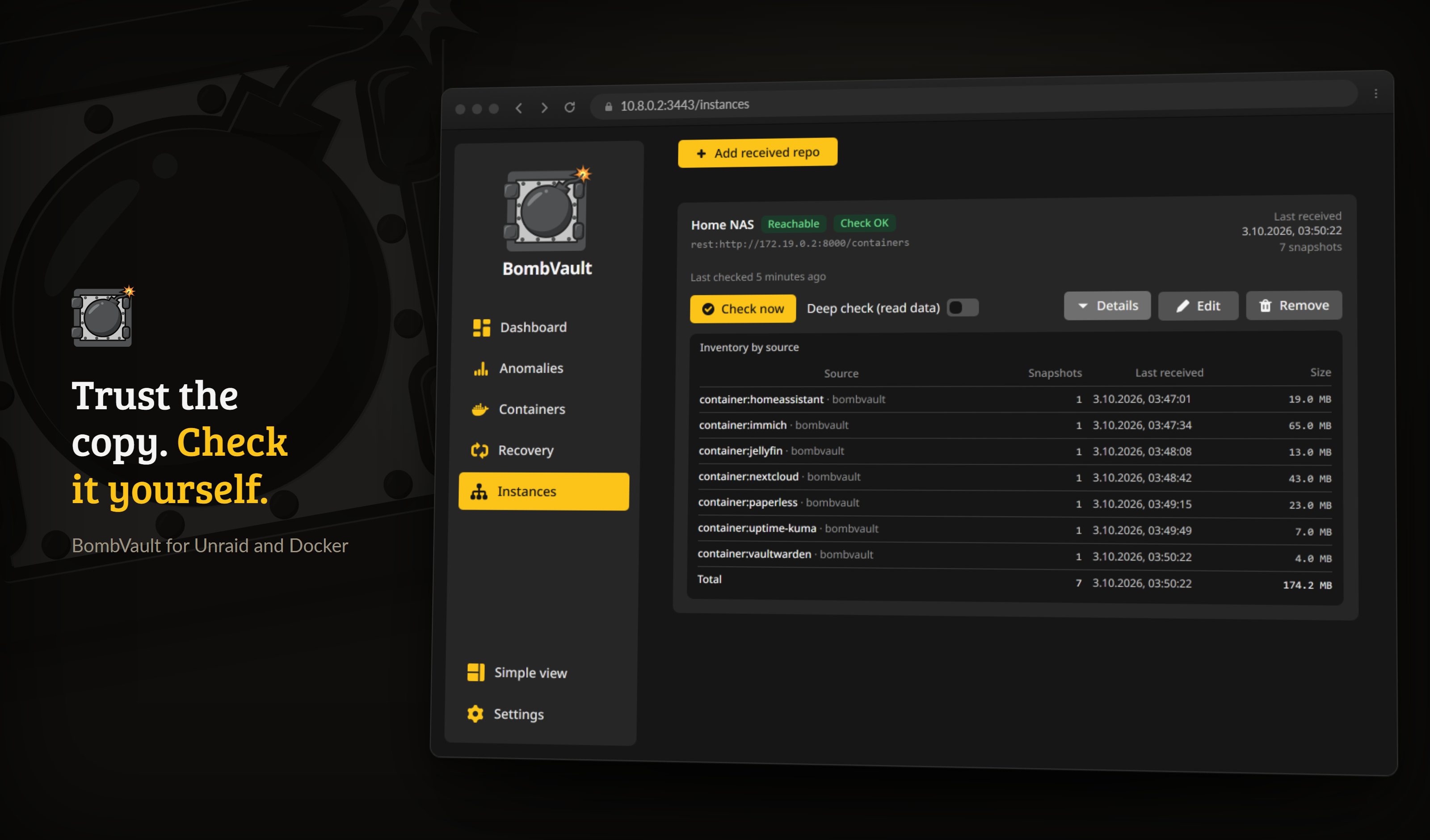
The receiving side, watched read-only, with an integrity check run on this hardware.
Everything above is the sending side. On the box that receives immutable off-site copies from another BombVault, the Receiver dashboard gives you independent, read-only monitoring of those repositories on the receiving hardware, so a silent failure at the far end does not go unnoticed.
Turn on the Receiver toggle in Settings to reveal a Receiver tab. It is off by default; enable it only on a box that actually receives immutable off-site backups. Then register a received repository (read-only, opened with the sending instance's restic password, which it gets over the pairing group) to get:
- A snapshot inventory grouped by source, so you can see exactly which containers, VMs and file sets have landed.
- Last-received per source, so you know how fresh each one is.
- An independent
restic checkrun on the receiving hardware, so integrity is verified where the data actually sits, not only on the sender. - A dead-man's switch: an alert when a source stops sending within a window you set.
- Integrity alerts: an alert when a check on the receiving side fails.
The Receiver is strictly read-only. It never writes to the received repository, so it can never break the append-only guarantee the sender relies on.
Receiving server
The receiving box can also run the rest-server the others copy to. Set up receiving server at the top of the Receiver tab asks for a folder on a share, with New folder to create one, and a port (8000 unless another container uses it). BombVault then:
- refuses if a container called
rest-serveralready exists or another container holds the port; - pulls
restic/rest-serverand starts it through the Docker socket in append-only mode with private repositories and a login file in the folder; - writes its Unraid template to the flash drive, so the container stays editable in the Docker tab, or offers the template as a download when the flash drive is out of reach;
- runs the tamper test against it and shows whether it refuses deletes.
The instances in your group then find the server in the destination wizard under From your group, named after the receiving box. Each instance gets a login of its own the first time it picks the server, and writes only into its own folder there. The card lists these logins, and Revoke login takes one away; what that instance already copied stays in the folder. Setup also creates one login for someone outside the group, whose password the card shows once.
An instance that reaches the receiving box only through the relay cannot use the server, because the relay carries no backups. Add the receiving box's address under Settings, Pairing first. When BombVault runs on an IP address of its own (on br0, for example), fill in Address for partners, because the server listens on the host's address.
Worked example: two Unraid boxes, end to end
Everything above describes the parts. This is one complete setup with real values, because the parts are easier to assemble when you have seen them assembled once.
Two boxes: TOWER runs the containers and pushes backups; VAULT receives them and enforces immutability. Substitute your own names, addresses and share paths.
1. On VAULT, stand up the append-only server. In BombVault on TOWER, go to Settings → Off-site → Set up, pick rest-server, and generate the deploy recipe. Copy the Unraid template (XML) tab, save it on VAULT as /boot/config/plugins/dockerMan/templates-user/my-rest-server.xml, then Docker → Add Container and pick rest-server from the template dropdown. Before starting it, write the shown htpasswd line into /mnt/user/appdata/rest-server/.htpasswd on VAULT. The one-time password is displayed once and never stored, so copy it now. That line carries the same password, bcrypt-hashed for you: the plaintext goes into TOWER's REST credentials, the hashed line goes into VAULT's .htpasswd. There is nothing for you to hash yourself.
Leave `--append-only` in the OPTIONS field. It is the whole point: without it VAULT is an ordinary share again.
2. On TOWER, point the off-site repo at it. The repo URL follows the pattern the recipe prints:
rest:http://VAULT:8000/bombvault-containers/containers
The first path segment is the htpasswd user, the second is the repository. Enter the generated user and password as the destination's REST credentials, then run the connection test.
3. On TOWER, turn on Immutable. The tamper test runs immediately and must say protected. What the answers mean:
| Result | What happened |
|---|---|
| protected | VAULT refused the delete. This is the only passing state. |
| NOT protected | VAULT accepted a delete. --append-only is missing or was removed. |
| inconclusive | Neither. Usually the URL is not the one restic itself uses, or the credentials changed. Nothing is recorded and no alert fires. |
4. On VAULT, watch what arrives. Pair the two boxes (Pairing instances), turn on Settings → General → Receiver, open the Receiver tab and register the repository read-only with TOWER as the sending instance.
The location is a path inside the container, written relative to the host mount
Enter user/appdata/rest-server/bombvault-containers/containers, not /mnt/user/appdata/.... BombVault runs in a container, where the host's /mnt is mounted elsewhere; an absolute host path does not exist inside it. If you paste one, BombVault now tells you the relative path to use instead.
VAULT gets TOWER's restic password over the group when you save; nobody types a key.
5. Make it mutual, if you want. Repeat the same five steps in the other direction: a rest-server on TOWER receiving VAULT's copy. Each box then enforces immutability for the other, and neither can delete the other's backups.
Guided recovery
A dedicated Recovery tab walks a fresh or rebuilt install through the disaster case, in one place:
- Restores BombVault's own settings first, so the backup paths, off-site targets and credentials the rest of the flow needs come pre-filled (applied via a self-restart over the Docker socket, so the live settings database is never overwritten under an open handle).
- Checks BombVault can read your backups (the encryption-key gotcha up front).
- Lets you point at your existing repo (local or off-site).
- Discovers the containers, VMs, file sets and ZFS datasets stored in it.
- Restores the containers and VMs in one go (left stopped, so you start them deliberately) and lists the file sets and ZFS items to restore one by one; ZFS items come back switched off. Your recovery kit is one click away.
Planned migration versus disaster
Guided recovery restores BombVault's own settings from a backup. For a planned move to a new box, you can instead carry your configuration over directly with the Export / import settings card (a portable JSON file). See Configuration.
Restore from another BombVault repo
A separate card on the Recovery tab opens a different BombVault instance's repo (a share mounted under /mnt, or a remote URL) with that instance's APP_KEY, in a one-time, read-only session. Browse the containers, VMs and file sets stored there, pick a snapshot and restore it, and the restored object becomes a normal local container, VM or file set. Nothing is ever written to the other repo, and your own backup settings stay untouched (the session lives in memory and expires by itself). Moving a container from server A to server B does not mean repointing your repo settings and reverting them afterwards. This card is a one-shot: it opens a session, restores what you pick, and forgets the other instance. If you want a standing arrangement instead, where this box fetches another instance's snapshots into its own repository on a schedule, that is the Pull tab of the Instances page.
A container whose network does not exist on this server, such as an Unraid br0 network on a plain Docker host, shows a network picker under its row. BombVault creates it on the network you pick, together with its other networks. The fixed IP and MAC address belonged to the old network and are dropped, so the new network assigns them.
Encryption-key recovery kit
This is the piece that makes disaster recovery possible even when there is no running BombVault.
One click downloads the master key, the derived restic password, and the exact repo locations and commands, so you can restore straight with the restic CLI on any machine. A Dashboard reminder nags until you have stored it.
Store the recovery kit off the server
The kit contains the secret that decrypts your backups. Keep it somewhere safe and separate from the server (a password manager, a printed copy in a safe). If you lose both BombVault and APP_KEY with no recovery kit, your encrypted backups cannot be recovered.
The newest snapshot is not always the one to restore
Since restic 0.17, restic snapshots shows each snapshot's size. After data loss the newest snapshot can be the emptied one, so do not restore a snapshot that is far smaller than the ones before it. After ransomware it can be the encrypted one at the usual size. If BombVault still runs, check its Anomalies page first: it names the last good backup. A restore does not need any of BombVault's anomaly data, and the retention pause only ever keeps more snapshots.
Sealing the kit
If you have turned on age encryption for the plain exports (Settings), the kit is sealed with it too and downloads as bombvault-recovery-kit.md.age. It is ASCII-armored rather than binary, so it is still plain text: pasting it into a password manager or printing it works exactly as before, the contents are simply unreadable without your key.
Do not store the age key inside the kit
You need your age private key to open a sealed kit. Keep it somewhere that does not depend on the kit itself, or you will have two things to recover instead of one. Sealing is worth it when the kit is stored somewhere you do not fully control (a shared password manager, cloud notes, a printout in an office); a kit in your own safe is already protected by the safe.
With encryption on and no usable recipient configured, the download is refused outright. BombVault never falls back to handing out the master key in the clear.
If you do not have the kit to hand
The password is not stored anywhere, it is computed from APP_KEY, so you can reproduce it yourself with nothing but the key and a shell:
printf 'bombvault:restic-repo' | openssl dgst -sha256 -mac HMAC -macopt hexkey:$APP_KEY -r | cut -d' ' -f1
That is HMAC-SHA256 over the fixed string bombvault:restic-repo, keyed with the raw bytes of the hex APP_KEY, printed as 64 lowercase hex characters. The same value is in the kit, listed as the derived restic password; this is for the day the kit is somewhere you are not.
For a received repository, use the SENDING instance's key
A repository that arrived here through off-site replication was created by the machine that sent it, with its APP_KEY. Deriving from the receiving box's key produces a password restic will reject, which reads exactly like a corrupt repository and is not. This is the usual reason restic check on a received repo asks for a password over and over.
Because recovery definitions live inside each repo (<repo>/def, <repo>/vm-def), a copied repo folder is fully self-contained, so the kit plus the repo is everything a bare-metal restore needs.
Getting a database dump back
A database dump is a restore point of its own in the containers repository, tagged dbdump:<container>, holding the single file /dbdump/<container>.sql. BombVault lists, downloads and imports them under Backups; below are the same steps with restic alone, for the day BombVault is not there.
restic -r <repo> snapshots --tag dbdump:<container>
restic -r <repo> dump --tag dbdump:<container> latest /dbdump/<container>.sql > <container>.sql
The tags dbversion: and dbname: on each dump say which server version it came from and which databases it holds. A complete file ends with -- PostgreSQL database cluster dump complete or -- Dump completed.
Import it into a container of the same or a newer version (PostgreSQL), or the same major version (MySQL and MariaDB), started once with an empty data folder so it initialises. The host needs no database client, the container has one:
docker exec -i <container> sh -c 'exec psql -X -U "${POSTGRES_USER:-postgres}" -d postgres' < <container>.sql
docker exec -i <container> sh -c 'exec mariadb -uroot -p"$MARIADB_ROOT_PASSWORD"' < <container>.sql
docker exec -i <container> sh -c 'exec mysql -uroot -p"$MYSQL_ROOT_PASSWORD"' < <container>.sql
For a single database out of a full dump, MySQL and MariaDB take --one-database <name> on the client command. A PostgreSQL dump has one section per database, each starting with a \connect <name> line: copy that section into its own file and import it with -d <name> after creating the database.
A root dump carries the server's users
A full MySQL or MariaDB dump taken as root contains the mysql system database, so importing it replaces the new server's accounts, including root's password, with the ones from the dump. On PostgreSQL, role ... already exists for the user the container created is expected and harmless.