Features
BombVault is simple by default and deep when you need it. The interface shows only the essentials until you flip the Simple view / Advanced view switch. This page groups the full feature set.
Backup scope
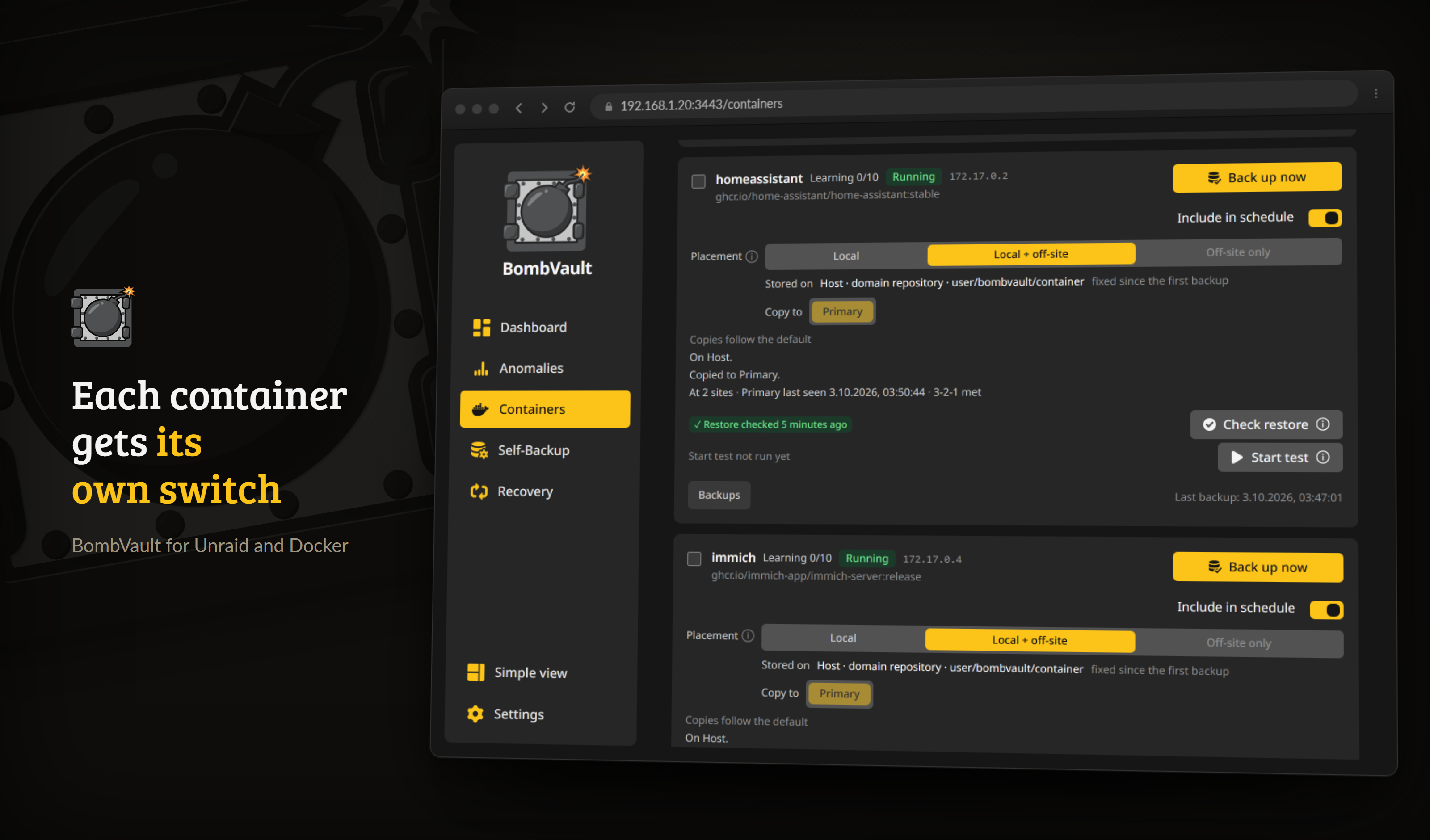
Containers, each with its own schedule toggle, backup order and per-container history.
| What | What is saved |
|---|---|
| Docker containers | Appdata directory plus the container definition (image, env vars, ports, labels, volumes). The whole appdata directory by default; Choose folders on the container ticks exactly which folders the backup covers, with a live count of the paths, a list of what you left out and a Skip cache folders switch per root (CACHEDIR.TAG). |
| KVM / libvirt VMs | VM disk image(s), XML definition and UEFI NVRAM (graceful shutdown or live snapshot, over SSH). Live snapshots fall back to a graceful backup automatically if the snapshot cannot be created, so a VM backup never just errors out. With Changed blocks only switched on, a running VM with qcow2 disks is read through libvirt checkpoints, so a backup reads just the blocks written since the previous one, and every snapshot still restores the whole disk on its own. Disks on ZFS zvols are streamed with zfs send over the same SSH link, so a VM whose disks are zvols is backed up as one VM. The state of a passthrough vTPM is saved next to the NVRAM when the domain XML names its path. An emulated vTPM, which TrueNAS sets up for Windows 11 guests, does not publish that path, so keep such a guest's recovery key to hand. See the VM backup guide. |
| Unraid flash | The whole USB flash (/boot): OS, license, array config, shares, network and plugin config. Restore is a one-click .zip download and never overwrites the live flash. |
| App configuration | BombVault's own /config (settings database, off-site credentials, libvirt SSH keypair), snapshotted with SQLite VACUUM INTO so a WAL-mode database is never captured mid-write. Restored via a self-restart, so the live database is never overwritten under an open handle. |
| Files & folders | Named file sets: any folder on the server (a share, your documents, a photo library), each with optional per-set exclude patterns. Full parity with the other domains (schedules, retention, off-site copy, integrity checks and restore drills). |
| ZFS datasets | A dataset together with every dataset below it, read from one ZFS snapshot so all of them come from the same instant, and stored with restic like a folder: deduplicated, browsable, single files restorable. New child datasets join on their own, single children can be left out, and a child that cannot be read is skipped and named. Optionally, containers are stopped or a command runs for just the instant of the snapshot. Volumes are not included: a VM's volume is backed up with its VM, a volume without a VM is not backed up yet. See ZFS datasets. |
Restore
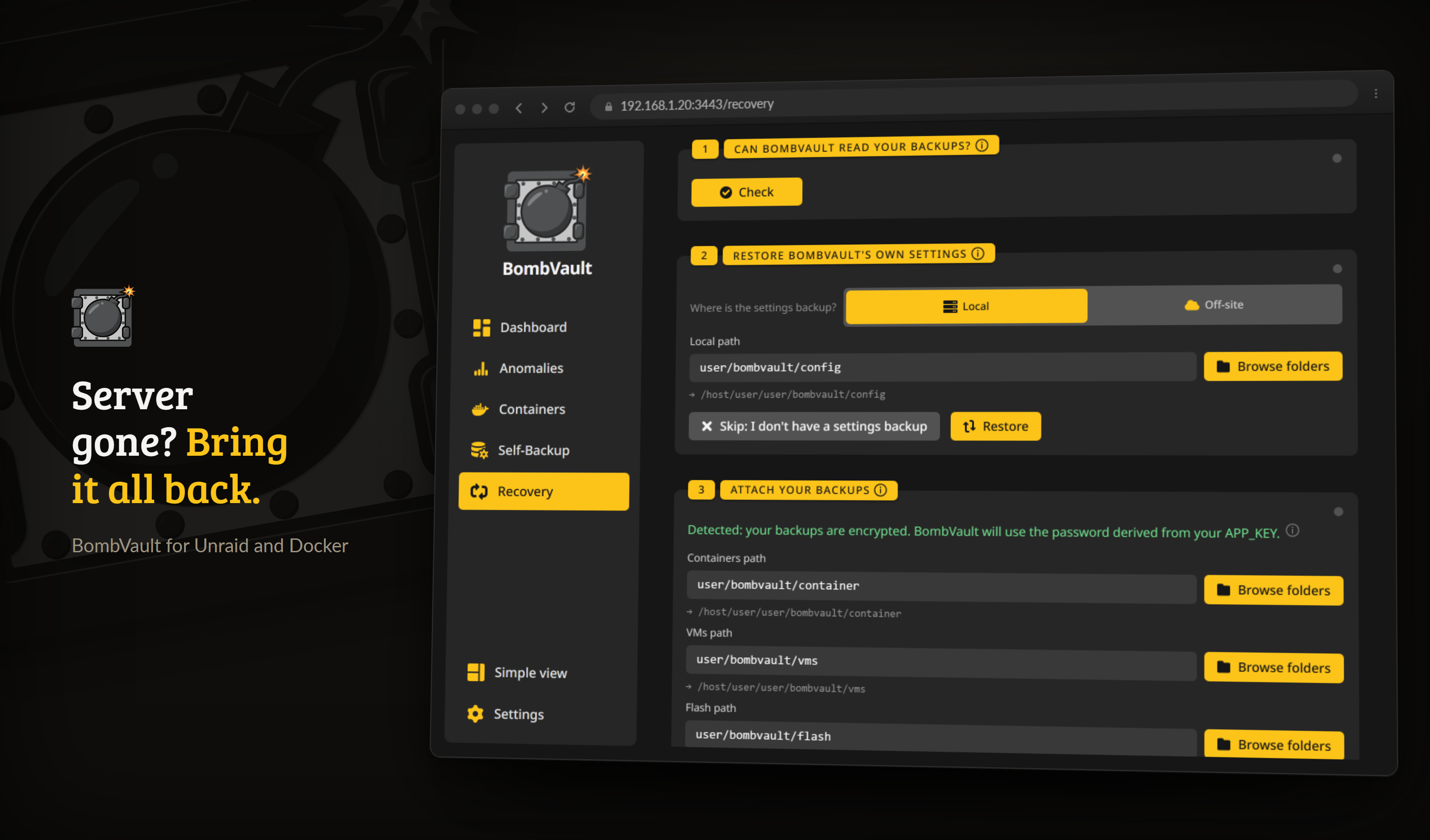
Guided recovery walks a fresh install through the disaster case in one place.
- One-click full restore. Pick a snapshot, click Restore. Done.
- One timeline per item. Containers, VMs, folder sets, the flash and the app configuration list their backups as one timeline over every place they lie, the repository they are written to and each off-site target. A backup copied off-site appears once, marked with each place. Off-site places are read when you open them, and deleting at one place says whether it was the last copy.
- Containers are automatically reinstalled. The container definition is replayed against the Docker API, so the container reappears in the Unraid Docker tab exactly as it was.
- GPU, limits and links come back. A restored container gets back its resource limits, log driver, DNS settings, legacy links and its GPU or runtime (
--gpus,--runtime=nvidia). On a host without that GPU driver or runtime the restore says so and offers Restore without GPU and runtime, also after restoring several containers or a stack. A link to a container that is missing, or stopped while the restored one starts, is left out, and the run history says so. - VMs are automatically recreated. The XML is re-imported over SSH so the VM reappears in the VM Manager with its disk and UEFI NVRAM reattached, even after the VM was deleted. Discover backups rebuilds an entry that is gone entirely (for example after a fresh install).
- Individual restore. Restore one container, one VM or one file set without touching the others.
- Flash restore is a
.zipdownload. It streams to your browser asflash-<id>.zip, ready to drop into the Unraid USB creator. The live/bootis never touched. - One plugin at a time. The flash page lists the plugins in each flash backup with their version and size, and puts a single one back into the running flash: its
.plgfile, its folder underconfig/pluginsand the package files the backup holds. Nothing else on the flash changes. Unraid installs the plugin on the next boot, or right away under Plugins, Install Plugin. - Scheduled flash zip export. After every flash backup, optionally write the snapshot out as a plain
.zipto a folder you pick (a single overwrittenflash-latest.zipor a rolling history). Point it at a Syncthing or rclone folder so your bootable-USB backup leaves the server automatically. - Pre-flight conflict check. Before anything is stopped or removed, restore verifies the container's static IP and published host ports are free, and aborts with a clear message instead of leaving a half-finished restore.
- Checks before the restore. Every restore dialog first checks that the repository answers, that the stored key opens it, that the restore point is there and that the target has room for what the restore writes. Start stays locked while a check fails, and the (i) in the button says which one.
- Restore plan. Before you confirm, the dialog shows what the restore does compared with what is there now: new, replaced and unchanged files, with the list on request, and the files at the target that are not in the backup and stay where they are. For containers and VMs it also compares the settings the restore recreates with the running ones: image and tag, ports, variable names and volumes, or memory, vCPUs, disks and network. restic works this out as a dry run from size and modification time, without reading the files; a very large tree stops after 30 seconds and says so. A stack restore checks and plans every member and names the one that blocks it.
- Shared folders. An in-place restore names every other container, running or not, whose bind mount reaches into a folder it writes to, for example "this path is also used by nextcloud-db". It warns and does not block.
- File-level restore. Expand a container snapshot's Files, filter, tick any number of files and folders, then restore the selection in place or into a folder you pick.
- File-set restore. Restore a file-set snapshot in place (after an explicit confirmation) or into a folder you pick, never silently. Selective restore works here too.
- ZFS dataset restore. Restore one dataset of an item into its place (after a ZFS safety snapshot that stays until you delete it), into a folder, or only the files you pick, or every dataset of a backup into a folder. A dataset is never rolled back or replaced.
- Restore keeps the run-state. A container or VM that was running when backed up comes back running; one that was stopped stays stopped. Tick Leave stopped after restore to recreate without starting.
- Restore a whole stack. Containers from the same Docker Compose project are grouped into a Stacks panel. Restore stack… rebuilds every member from its latest backup left stopped, then optionally starts them in
depends_onorder. - Live progress, cancel and busy feedback. A long restore shows a live percentage bar and can be cancelled with a type-aware confirmation. A cancelled restore is recorded as cancelled, not failed.
- Guided recovery. A dedicated Recovery tab walks a fresh install through the disaster case. See Off-site & recovery.
- Restore from another BombVault repo. A one-time, read-only session opens a different BombVault instance's repo with that instance's
APP_KEY, so you can pull a container from server A to server B without touching your own settings. See Off-site & recovery. - ZFS properties come back. Every ZFS backup keeps the locally set properties of each dataset, such as compression, record size, quota and case sensitivity. A restore into a new dataset creates it with them, and a restore into an existing dataset shows them and sets them only when you ask for it. See ZFS datasets.
- Import from the Appdata.Backup plugin. On the Recovery page, point BombVault at the plugin's backup folder. Each container archive becomes a restore point of its container, dated when the plugin made it. Archives imported before are skipped, and the archives themselves are only read. The container needs one backup in BombVault first, so the restore has its definition. Retention leaves imported restore points alone, so delete one yourself when you no longer need it.
Storage & scheduling
- Incremental, deduplicated backups via restic, so even large VM disks do not balloon the repo.
- Destinations: a local path, or off-site. SMB shares and WebDAV servers (Nextcloud, ownCloud, SharePoint) straight from a form under Settings, Cloud access, rclone, with no host mount; NFS (mount the export on Unraid and point a Backup Path at it); native restic backends without rclone (
s3:...,rest:http://host:8000/repo,sftp:user@host:/repo), or any rclone remote viarclone:<remote>:<bucket>/path. All credentials are stored encrypted. - SSH targets need nothing installed on the far side.
sftp:only requires an SSH server, so a bare Raspberry Pi (no Docker, no restic) works as an off-site destination. Host keys are pinned automatically on first contact. - Off-site copy (local + remote). Keep the fast local backup and add one or more off-site replicas, replicated with
restic copyon a best-effort basis (an off-site hiccup never fails the local backup). Each domain has its own off-site schedule, plus a Replicate now button. - Multiple off-site targets per domain. Each domain (containers, VMs, flash, config, file sets and ZFS datasets) can replicate to several off-site destinations at once, not just one. Add extra targets on the Off-site page, each with its own repository, S3 storage class, append-only flag, retention and growth budget. Your existing off-site copy is carried over as the first target, so nothing changes until you add a second one, and every target of a domain replicates on that domain's off-site schedule.
- Named repositories. Write your backup locations down once under Settings, Storage, Repositories, a local path or any restic remote with its own credential set, then choose one as an item's location on its card. A row shows how many items point at it, and a repository that an item or a placement default uses cannot be moved or deleted, because BombVault never moves a backup that has already been written.
- Several sets of cloud credentials. The shared cloud credentials apply everywhere by default, but any destination can pick a named credential set instead (Settings, Cloud access, Additional credential sets), so a Hetzner S3 bucket and a local Garage server can run side by side, each with its own key. That includes off-site targets and a backup path that is itself a remote repository.
- Destinations. An off-site destination is set up once, through a wizard that lists S3 storage services, your own S3 server, your own server and shares, and every cloud storage rclone supports, with the sign-in, a connection test, a folder picker and an honest word on delete protection. It then appears as a button on every domain and item. See Destinations.
- Placement per item. Every container, VM and folder set card has a row of buttons, Local and one per off-site target, and the lit ones get its backups. A share that already sits on a NAS no longer has to go to B2 as well. The location is fixed from the first backup on, the copies can change at any time, and the card says how many sites hold the item and whether 3-2-1 is met. See Placement per item.
- Placement defaults. One row per domain sets where new items are written and which targets items without a choice of their own are copied to. Changing it moves no backups and says beforehand which targets gain or lose items.
- Manual backup order. Set the exact order your containers are backed up in from the Backup order panel on the Containers page. Scheduled and multi-select runs follow it; any container you leave unordered keeps the previous most-overdue-first behaviour, and a single container backup is unchanged.
- Configurable retention: keep-last / daily / weekly / monthly / yearly, pruned automatically after each backup, set per source (both local and off-site on Settings, Retention, so you can keep off-site copies longer as an archive). Each source can also have keep rules of its own, locally and off-site (Keep rules per source), for example 7 daily backups of containers that change every day and fewer of VMs that rarely change.
- Compression per repository: Off, Automatic (restic's default) or Maximum, set under each backup path and each named repository on Settings, Storage and on each off-site destination on Settings, Off-site. Backups, off-site copies and prune write with it, and the recovery kit names it, so plain restic can keep writing the same way.
- Per-domain scheduling (daily / weekly including multi-day sets / every-N-days / raw cron), all edited in one place on Settings, Schedules. A single container, VM, folder set or ZFS item can carry a cadence of its own, and Every N days also works for the restore drill, the tamper test and the weekly digest.
- Wait until the app is idle. A container can let its scheduled backup wait while its app is busy, for at most the hours you set, and start as soon as the app is idle. A media server counts as idle when it isn't streaming, any other container when its CPU and traffic stay below the limits under Settings, Schedules for a few minutes (on the host network only CPU counts). The waiting backup shows in the activity log and on the container with its reason and deadline. It holds no lock, so the other containers go ahead. Manual backups never wait. The members of a compose stack due in the same run wait together, and a wait carries on with its deadline after a restart. Switching the containers off drops every waiting backup, and switching their schedule off drops the ones its runs held back. Lowering the hours shortens a wait that has already begun.
- Off-site bandwidth limits. Cap the restic upload/download rate so replication does not saturate your WAN.
- Streaming first. While a media server such as Plex, Jellyfin or Emby streams, off-site copies upload at a lower limit and return to the normal one a few minutes after the stream ends. BombVault reads the media servers' outgoing traffic from Docker. REST, S3, B2, Azure, Google Cloud, Swift and rclone over HTTP slow down in the middle of a copy; SFTP and local or mounted folders take the lower limit at their next copy step. A media server on the host network can't be measured. Under Settings, Off-site.
- Cold and archival storage class (S3). For a native S3 off-site repo you can pick the storage class, restricted to restore-readable tiers (Standard, Standard-IA, One Zone-IA, Intelligent-Tiering, Glacier Instant Retrieval) so archival pricing never silently breaks a restore. The deep-archive tiers that first need an async thaw (Glacier Flexible, Deep Archive) are intentionally left out. Native S3 backends only; rclone remotes set their class in the rclone config.
- Backup folders stay copyable off-box. After every backup BombVault relaxes the local repo tree to dirs
0755/ files0644(repos are encrypted, so nothing is exposed) so a non-root sync user over SMB is not locked out. Recovery definitions live inside each repo, so a copied repo folder is fully self-contained.
Insight, verification & monitoring
- Pause from the card. Every container, VM and folder set card has Pause schedule, which takes the item out of the schedule and out of Backup Everything, and Resume schedule to bring it back. It sets the same switch as Include in schedule, so the two always agree. A paused item wears a grey Schedule paused badge, and Back up now still works.
- Protection status (RPO). The Dashboard shows a green / amber / red indicator per domain, comparing the last successful backup against its schedule, so an overdue backup turns red instead of hiding in a log.
- Backup-health heatmap. A GitHub-contributions-style calendar of per-day backup outcomes per domain, with a Containers / VMs / Flash / Self-Backup / Folders toggle.
- Run timing everywhere. Every run-history entry reads
start, end (duration), and each container and VM carries its own Recent runs list on its page. - A dashboard you can rearrange. Toggle customize mode to drag cards into your order and hide the ones you do not need. The layout is saved per browser.
- Repository size & dedup trend. Current repo size, deduplication ratio and snapshot count per domain, with a sparkline of storage growth.
- Restore-verification drills. BombVault periodically proves your backups are restorable (
restic check --read-data-subset, bounded) and shows a Verified restorable badge per domain. - Restore check after the first backup. When an item's first backup is done, BombVault restores a sample of it (up to 100 files and 256 MiB) into a temporary folder under the restore folder, has restic read every file back against its hashes, and compares the sizes with the backup. A file too large for the sample, such as a VM disk, gets its first 64 MiB read back instead. The item card shows the result, a failure goes out as a notification, and Check restore runs the same check on the newest backup whenever you want. Later backups do not repeat it.
- Start test. Checking the bytes does not show that the app comes back. Start test on a container card restores its newest backup into an isolated copy and starts it: a name starting with
bombvault-test-, an internal Docker network of its own with no published ports and no way to the LAN, 1 CPU and 2 GiB of memory, and the data in a temporary folder under the restore folder. The test passes when the container's healthcheck reports healthy, or, without one, when its first exposed port answers from inside that network, or, with neither, when it keeps running. The original container is never stopped or changed, and the copy, its network and its data are removed afterwards, also after a restart of BombVault in the middle of a test. Containers on the host network, privileged ones, ones with devices and ones that need another container are shown as not testable. Switch on Start test under the scheduled restore checks to test one container per run, the one tested longest ago first. The result shows on the card and on the dashboard. The copy carries none of the original's labels and runs without the capabilities, security options, sysctls and cgroup parent the original adds. A container that needs them fails its test, and the result names what the copy ran without. - Self-healing operations. A provably orphaned restic lock (left by a mid-operation restart) is force-cleared and retried once, automatically. Retention is identity-stable (pruned per item, immune to path or host changes) and a retention failure sends a notification.
- Warnings the folder scan cannot see. The exclusion assistant answers a size question. Some of the most expensive backup mistakes are not size questions, so it also carries app-specific caveats about how an application stores its data. The one it exists for: Immich keeps every photo's albums, faces and dates in a PostgreSQL database that runs in a separate container, so a file-level backup of the Immich container restores the pictures without any of that, and the restore looks like it worked. The warning shows whether or not any exclusion is offered, including on a container with nothing selected to scan, because the caveat is true either way.
- Not backed up (coverage). A Dashboard card naming everything on the server that no automatic backup covers, with the reason for each: never added to BombVault at all, present but not included in the schedule, its own schedule set to off, or no schedule switched on anywhere. The protection indicator above it answers a different question, namely whether the backups that are scheduled ran on time, and it cannot see the container nobody ever set up: that one is absent from every list and every error, so nothing turns amber for it. Containers are read from the live Docker list rather than from BombVault's own rows, because an item with no row is exactly the one that needs naming. A backup type you switched off is left out of the count entirely, since that was your choice.
- Retention preview. The panel beside the retention settings shows what the next run is about to delete, before it happens: per repository and per item, with the restore points named. It takes no repository lock and changes nothing, so it answers even while a backup is running. Retention switched off says so rather than showing an empty list, an append-only repository is labelled as one (retention never runs there at all), and a repository that could not be reached is named instead of silently missing. Under Settings, Retention for both the local and the off-site policy, each previewing its own.
- Anomalies. Every backup of a container, VM, folder set, database dump, the flash drive and the self-backup is compared with that item's own history. The checks look at the new data a run stored, against the largest usual amounts of recent backups and against the usual rate per hour; at a backup that stored most of the data again, which includes files that were renamed and rewritten; at the source size and file count restic reports for each item and each database dump; at restic's own backup time; at failure streaks and intermittent failures; at restore checks that stopped passing; and at the free space of local, SFTP and rclone repositories, projected from the repository's growth. An item learns from its first 10 backups, while an almost empty source, a rewrite of most of the data and failures are checked from the start. On upgrade the history is read once from the snapshot summaries restic 0.17 stores, so an existing install does not start from zero. Sensitivity (Strict, Balanced, Permissive) and the lowest severity that sends a notification are set globally on Settings, Integrity and can be changed per item. Warnings close by themselves once the cause is gone; critical findings about lost data and a filling disk stay until you acknowledge them, and an acknowledged finding is not raised again until its cause has gone away once. Mark as expected makes a new level normal after 10 backups but never switches off the almost-empty check, and a changed selection starts the item's history afresh by itself. While a source is almost empty, has shrunk sharply or had most of its data stored again, retention keeps that item's old backups until you acknowledge the finding or mark it as expected, and the finding links to the last good backup. A notification goes out once per episode, and failures and restore checks that already notify are not reported twice. What it does not do: S3, B2 and REST repositories have no free-space figure, on the Unraid user share the free space is that of the whole array, and backups made before restic 0.17 carry no size history. ZFS items are checked too, dataset by dataset: every dataset of a tree has its own history, one that was emptied or could no longer be read counts as lost data, and only that dataset's old backups are kept. How a ZFS item is watched dataset by dataset is described under ZFS datasets, and an assistant can read the open findings through the MCP server. A finding about the size or file count of a source is dated to the first backup it showed in, and Compare with the backup before lists the folders where files went away, came in or changed, with a note when nearly all of it sits in a search index, a cache or thumbnails that the app rebuilds by itself.
- Recommended excludes per app. For well-known images (Plex, Jellyfin, Emby, Sonarr, Radarr, Lidarr, Readarr, Prowlarr, Immich, Nextcloud, PhotoPrism and Tautulli, from linuxserver, hotio, binhex or the official publisher) the exclusion assistant offers the folders the app fills again on its own: caches, logs, preview images and posters. Each entry says what it holds, any of them can be switched off, and nothing is excluded until you press Exclude selected.
- Support bundle. A one-click, redacted ZIP for a bug report: the host-integration check, your configuration with every secret removed, the recent runs, what is scheduled next, and the recent log. It also carries how the last dump of each database went, the ZFS items with the mounts the container sees, the open anomalies, and how many MCP keys exist (never their names). Passwords, tokens, the rclone config, notification credentials and any password embedded in a repository location are all stripped, and the bundle says so in its own manifest, because a support file must never be mistaken for a configuration backup. It requires a login password for the same reason the recovery kit does. The log it carries is this container's output since it last started; for a crash that restarted the container,
docker logsremains the place to look. - Encryption-key recovery kit. One-click download of the master key, the derived restic password and the exact repo locations and commands, so you can restore without a running BombVault. See Off-site & recovery.
- Export and import your settings. An Export / import settings card on the Settings, System page writes your whole configuration (domain settings, off-site targets, schedules, retention, notifications) to a portable JSON file, so moving to a new box or cloning a setup does not mean re-entering everything by hand. You choose whether to include the off-site and notification credentials; with them the file is as sensitive as your recovery kit. Import shows a preview and asks for confirmation, and it never touches your backup data or history.
- Notifications. Webhook (Discord / Slack / Gotify / ntfy), Matrix, Healthchecks.io, email (SMTP), a self-hosted Apprise API server, and Unraid's native notification system. Policy per backup: never / on failure / always. A scheduled run of many items can send one N of M items succeeded summary. Healthchecks gets the full lifecycle (
/start, then success or/fail) whenever a URL is set. - Weekly digest. One message a week through the same channels: run counts, how much new backup data arrived, whether off-site is current, and the top failures. Off by default, with its own cadence on Settings, Notifications, so a quiet week is reported as one too.
- Prometheus
/metrics. Opt-in (default off, optional bearer token) for Grafana or Uptime Kuma. Exposes backup status, sizes and timestamps, with no secrets or paths in the labels. - HTTP API, Home Assistant and mDNS. Scripts and dashboards get an API under
/api/v1with named tokens, read-only or allowed to start backups. Home Assistant finds BombVault through MQTT discovery, as a device with sensors and, if you allow it, a backup button per domain. And BombVault announces itself on the network asbombvault.local. See API and integrations. - Free space and weeks until full. Local repositories, SFTP repositories and SMB or WebDAV destinations that report it show their free space and how many weeks are left at the current growth. S3, B2 and REST repositories say "Free space unknown", since those backends do not report it.
- Size by folder. In the Backups section of a container, VM or folder set, Size by folder shows which folders and files take the space in the newest backup and how much of each the latest backup brought in new or changed, one level at a time. BombVault reads it from the repository's index without reading the files, and keeps it current after each backup once you have opened it.
- Why a backup was slow. While a backup runs, BombVault watches how busy the CPU, the disks and the network are. When a backup takes much longer than usual and one thing was clearly at its limit, the run says so, for example "The target disk disk1 was 98% busy" or "BombVault used 100% of the CPU limit of its container". Otherwise it says nothing.
- Changed since the last backup. A container that was recreated with another image, other ports, variables or volumes since its last backup gets a mark beside its name. Its (i) lists what changed, variables by name only. It is only a note and goes away with the next backup.
Ransomware protection
- Immutable (append-only) off-site. Flag an off-site repo append-only so ransomware or a compromised host cannot delete or rewrite your backups. The far side (a
restic/rest-serverin--append-onlymode) enforces it; BombVault only ever verifies it and never shows green on a configuration claim alone. - Tamper test. BombVault periodically proves the append-only guarantee by actually attempting a delete against the off-site repo (aimed at a non-existent object): refused means protected, accepted means not protected. An inconclusive result never flips the stored verdict.
- Guided off-site setup. A wizard walks you from backend choice through a ready-to-paste rest-server deploy snippet, a connection test, the immutable toggle and a retention strategy.
- DR drills (off-site). Restore a real target from the off-site repo into a throwaway sandbox, verify it file-for-file and byte-for-byte, then clean up. See Off-site & recovery.
- Ransomware-protection scorecard. A Dashboard card with a green / amber / red posture per domain and an age-stamped checklist; every red row deep-links to the fix. It only goes green on verified facts.
- Growth-budget alarm. For an immutable off-site (where old snapshots are deliberately never pruned), set a size budget and get alerted before it runs away.
- Pairing by phrase. Instances join one group by twelve words: create the phrase on one, type it on the next. Members on the same network talk directly, the others through a relay (the project relay, your own, or none), and every call between them is end-to-end encrypted. The group carries the scorecards on the Instances page, Mesh off-site offers and what a receiver or pull source needs, never backup data and never the APP_KEY. See Off-site & recovery.
- Instances page. Turn on Instances in Settings for a page with a card for every instance of your group, this one included: its address, whether it is connected, and each domain's protection state with its last backup, the same red, amber and green the local Dashboard shows. Check now asks a member to verify one domain's repository. Nothing on the page can start a backup, restore or delete anything on another box.
- Mesh off-site. A member can offer its own off-site storage to another member over the group. The other admin sees the offer on the Instances page and accepts or declines it; accepting creates an ordinary credential set and off-site target. Only connection details travel this way, never backup data.
- Receiver dashboard (receiving side). On the box that receives immutable off-site copies from another BombVault, turn on the Receiver toggle (Settings) to reveal a Receiver tab. Register a received repository read-only (opened with the sending instance's restic password, which arrives over the pairing group) to see its snapshot inventory grouped by source, when each source last arrived, and run an independent
restic checkon the receiving hardware. It alerts you when a source stops sending within a window you set (a dead-man's switch) or when an integrity check fails. Strictly read-only, so it never writes to the received repository, and off by default. See Off-site & recovery. - Pull from another instance (fetching side). The mirror image of off-site replication: instead of this box pushing its snapshots out, it fetches somebody else's in. Turn on the Pull toggle (Settings) to reveal the Pull tab of the Instances page, pick the other instance from your pairing group and its repository location, then choose which kind of backup it holds and how often to fetch. Its restic password comes over the group, never its APP_KEY. The far side configures nothing more and does not have to be running. The source repository is only ever read: it is opened to check the password, listed, and named as the source of the copy, and never initialised, unlocked, pruned or written to. Each side keeps its own credentials, and an
rclone:source is refused because rclone would reach it with this instance's remotes. See Off-site & recovery.
Plain exports
- Container plain export. A per-container Export (plain tar) button writes a browsable, tool-free copy next to the repo:
<name>.tar.gzof the backup folders plus the Unraid<name>.xmltemplate. Restic stays the engine; this is an extra convenience copy. - VM plain export. VMs have the same Export (plain tar):
<name>.tar.gzof the disk image(s) plus<name>.xml, restorable withvirsh defineplus the disk, no BombVault or restic needed. - Encrypt the plain exports (age). The exports sit outside restic, so they are plaintext by default. Turn on age encryption under Settings and add one or more recipients (an age public key or an SSH public key). Each export (container and VM
.tar.gz, their.xmlsidecars, and the flash ZIP) is then sealed for those recipients, and you decrypt it later off the box with the matching private key. As a safety rule, with encryption on and no valid recipient set, an export fails with a clear error instead of ever writing plaintext. - The recovery kit is sealed too. With the same setting on, the kit downloads as
bombvault-recovery-kit.md.age. It is ASCII-armored rather than binary, so it stays plain readable text: you can still paste it into a password manager or print it, which is what the kit is for. The same safety rule applies, so encryption on with no usable recipient refuses the download rather than falling back to handing out the master key in the clear. One thing to get right when you turn this on: you need your age private key to open the kit, so keep that key somewhere that does not depend on the kit itself.
AI assistants (MCP)
BombVault has a built-in MCP server, so an assistant such as Claude Code or Claude Desktop can read backup status, coverage, run history, restore points and current activity. With a key that allows it, the assistant can also start a backup of one item, one domain or everything, and cancel the backups it started. Restores, deletions, prune and settings stay in the web interface. Each client gets its own key under Settings, Integrations, MCP server; a key is shown once, stored only as a fingerprint, and can be renamed, replaced or revoked at any time. Starts are limited per hour and per item, and a retention guard keeps assistant backups from pushing your own restore points out of a "keep last N" policy. Every run an assistant starts is marked "via MCP" with the key's name. See MCP server. Database dumps and ZFS datasets are among the items and restore points it reads, and it can list the anomalies BombVault noticed.
Apps and companions
- Android app. Every server of your group on your phone, with the activity log of all of them on one screen. It pairs with your group by QR code and opens each server already signed in. See Android app.
- Receiving server. The box that receives off-site copies can start an append-only rest-server with one click and offer it to the other instances of your group, each with a login of its own. See Receiving server.
- Settings, Apps. A page that starts with the Android app, its APK for the release the server runs and a QR code for it, followed by a card for each companion. ParleyPort's card offers its Unraid template, copies the Docker command that starts it, and leads to its repository and to the relay settings under Pairing. The BombVault Widget's card offers its template and its repository, and installs or removes the plugin over the host SSH connection.
- BombVault Widget. A tile on the Unraid Dashboard with BombVault's activity log and the next scheduled run. Without a host SSH connection the card hands you the
.plgaddress to install under Plugins, Install Plugin, and the plugin can be removed there like any other. - Embeddable activity log. Generate a read-only token under Settings, Integrations and you get an address for any dashboard that shows an iframe, such as Homepage, Organizr or Heimdall: a small page with just the live activity log. The token grants that log and nothing else, and Disable revokes it at once. The embedded page is in English only.
Other
- Stop a backup that is running. Every card that can start a backup has a Cancel backup button beside its progress bar while the run is active. The run is recorded as cancelled, not failed. Stopping is safe, because restic writes its snapshot last, so an aborted run leaves unreferenced data and no snapshot.
- Back up many at once. Multi-select containers and hit Back up selected. The batch runs server-side, so it keeps going even if you close the tab or lose the connection. BombVault never backs up (and so never stops) its own container.
- Snapshot browser with a restore-point list, per-snapshot delete, and a collapsible folder tree for file-level restore.
- Repository maintenance per domain: Verify (
restic check), Unlock (clear a stale lock), and Prune (applies the retention policy on demand when one is set, otherwise a plain space-reclaim). - Progress for verify, restore checks and prune. While one of them runs, the activity log and the Integrity card show how far restic has counted, such as 12 of 47 packs, with the time left in that step once there is enough to estimate it. restic counts packs, snapshots and index files here, not bytes, so that is what the bar shows; before the first count it runs without a number.
- Automatic database dumps. Recognised PostgreSQL, MySQL and MariaDB containers (the official images, PostGIS, TimescaleDB, pgvector, pgautoupgrade, Immich's database images, linuxserver, yobasystems and jc21 MariaDB, and Oracle's mysql-server) are dumped before each backup, from the running server. Containers that only look like a database get the same option on their card, switched off until you choose it. The dump streams straight into the repository as a restore point of its own, next to the files backup, and is never written to a disk. Credentials come from the container's own variables, including
*_FILEsecrets, and never leave it. Each card shows whether the database's data folder is saved while stopped, copied while running, or not saved at all. A failed dump does not fail the backup: it shows up as a failed run with its reason and a hint how to fix it, and sends a notification. Dumps are never loaded back automatically. Download one (plain or compressed), save it to a folder, import it into a freshly started database with one click, or fetch it with the restic CLI. Switch it off per container, with the labelbombvault.dbdump=false, or for all containers in Settings. Anomaly detection also watches the size of every dump, and an assistant can list a container's dumps through the MCP server. - Pre/post-backup hooks per container. Shell commands run inside the container (for example flushing a cache); a failing pre-hook aborts the backup. Recognised databases are dumped automatically, so they need no hook.
- Stop other containers during backup, with a health-gated restart. Name dependent containers (for example a database) to stop while this one is backed up. Afterwards BombVault brings them back in their Compose
depends_onorder and, by default, waits for each one to report healthy (or running, if it has no healthcheck) before starting the containers that depend on it, so a dependency like Pi-hole, a database or a VPN gateway is actually up before the services that need it, instead of those returning to a connection refused. The wait is bounded by a per-container timeout (120 seconds by default) so a slow or never-healthy container can never hang the run; both the wait and the timeout live on Settings, Containers (turn the wait off for the previous all-at-once restart). The same ordered, health-gated restart also wraps the post-backup image update, so on a day an update lands the dependents are held down through the recreate and only brought back, health-gated, once it is done. - Exclude patterns per container. List subdirectories to skip inside a backed-up volume, one per line. Type the paths as you see them inside the container; a live preview shows what each line resolves to and warns when a line would exclude nothing.
- Update after successful backup (advanced, off by default). Flip this on a container and BombVault pulls the newest image and recreates it, but only when there is actually a newer image, so a fresh restore point always exists first. Optional extras: a notification per updated container and image cleanup (a base image shared by other containers is never deleted). After the update BombVault also asks Unraid to re-check that one container's update status, so the Docker tab's stale update available banner clears itself instead of lingering (Unraid updates go straight through the Docker API, so its cached status, and on some versions a cached digest, would otherwise keep showing the banner). It is best-effort, never affects the backup, on by default and has a toggle in Settings.
- Restore to an alternate folder for cloning or inspection.
- Snapshot diff & tags. Compare two snapshots to see what changed, and tag snapshots to filter them.
- What's new after an update. Release notes pop up once per new version, served from notes embedded in the binary, so the dialog works offline.
- HTTPS out of the box (self-signed, or bring your own cert behind a reverse proxy).
- Docker healthcheck. The container reports healthy/unhealthy from its own
/api/health, so an auto-heal tool can restart it if the engine ever wedges. - Dark/light UI in 42 languages with a flag picker.
- Settings save themselves. Flip a switch or leave a field and the change is written at once, with a short flash on the control and a shake if the server refuses it. Three places keep a Save button because saving them half-done would be unsafe: the rclone config box, the credential set editor and the login password.
- Quiet toasts. Under Settings, General you can mute the routine confirmations, so only failures still interrupt you. This is per browser and does not touch the notifications.
- Make it look how you want it. Settings, Look sets the colours (one accent, or Rainbow Mode with a palette of eight), the corners (round, soft or square) and the animation (off, subtle, wild or storm), remembered per browser. When your system asks for less motion, that always wins.